
Troubleshooting Steps for Respondus LockDown Browser
Follow the steps below to uninstall, reinstall, and verify Respondus LockDown Browser and Respondus Monitor.
Step 1: Uninstall Respondus
- Uninstall all existing versions of Respondus LockDown Browser from your computer.
Step 2: Clear Your Browser Cache
- Open Google Chrome.
- Clear the browser cache following these instructions:
https://support.google.com/accounts/answer/32050?hl=en&co=GENIE.Platform%3DDesktop
Step 3: Restart Your Computer
- Restart your PC to ensure all changes are applied.
Step 4: Download and Install Respondus
- Open Google Chrome and log in to Racer’s Online.
- Navigate to your course.
- Click Modules and scroll until you locate the quiz titled
“Respondus‑Student Test Quiz.”

- Open the quiz.
- Continue until you see the prompt to download the latest version of Respondus Monitor.
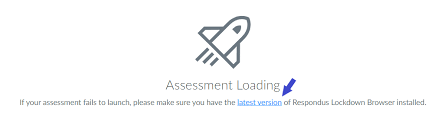
- Click the hyperlink provided.
- On the new page, click the Download Respondus button.
- Download and install the software.
Step 5: Verify Installation
- Reload the quiz page.
- Open the same quiz again to confirm that Respondus Monitor launches correctly.
Mac Users (If Issues Persist)
If you are using a Mac and the steps above do not resolve the issue:
- Use the following link to download, install, and run Respondus LockDown Browser:
https://download.respondus.com/lockdown/download.php?id=586108020 - Follow the on‑screen installation instructions carefully.
Step 6: Launch the Exam
- Start Respondus LockDown Browser.
- Log in to Canvas.
- Navigate to your exam and begin.